

जब भी मेरा फ़ोन चार्जर अचानक काम करना बंद कर देता है, धीरे चार्ज होने लगता है, या केबल को मोड़ने पर ही कनेक्ट होता है, तो मुझे लगता था कि मैं अकेला ही इस समस्या से जूझ रहा हूँ, लेकिन वास्तव में कई लोग इस समस्या का सामना कर रहे हैं। अगर आप भी इसी समस्या से जूझ रहे हैं और अपने फ़ोन चार्जर को ठीक करना चाहते हैं, तो यह लेख आपके लिए है। 2025 में, चार्जिंग की समस्याएँ स्मार्टफोन की शीर्ष 3 समस्याओं में से एक हैं और यहाँ आप इस समस्या को ठीक करने का तरीका जान सकते हैं।.
अच्छी खबर क्या है?
चार्जर की अधिकांश समस्याएं सरल होती हैं और इन्हें बिना किसी तकनीकी कौशल के घर पर ही ठीक किया जा सकता है। यह गाइड बताती है कि आपका फोन चार्जर काम करना क्यों बंद कर देता है और इसे चरण-दर-चरण कैसे ठीक किया जाए।.
1. जांचें कि समस्या चार्जर में है या फोन में।
फोन चार्जर जैसी किसी भी चीज की मरम्मत करने से पहले, यह पता लगाएं कि खराबी क्या है:

ए. किसी दूसरे चार्जर का इस्तेमाल करें
यदि आपका फोन किसी दूसरे चार्जर से सामान्य रूप से चार्ज हो जाता है, तो समस्या आपके चार्जर में ही है।.
अगर फिर भी चार्ज नहीं होता है तो हो सकता है कि आपके फोन का पोर्ट या बैटरी खराब हो।.
बी. किसी अन्य उपकरण से जांच करें
चार्जर को दूसरे फोन में प्लग करें।.
अगर फोन चार्ज हो जाता है तो आपके फोन का चार्जिंग पोर्ट खराब है। अगर चार्ज नहीं होता तो चार्जर खराब है।.
2. चार्जिंग पोर्ट को साफ करें (सबसे आम समाधान!)
धूल और गंदगी कनेक्टर को अवरुद्ध कर सकती है और केबल को ठीक से संपर्क करने से रोक सकती है, जिससे फोन चार्जर को ठीक करने में मदद मिलती है।.
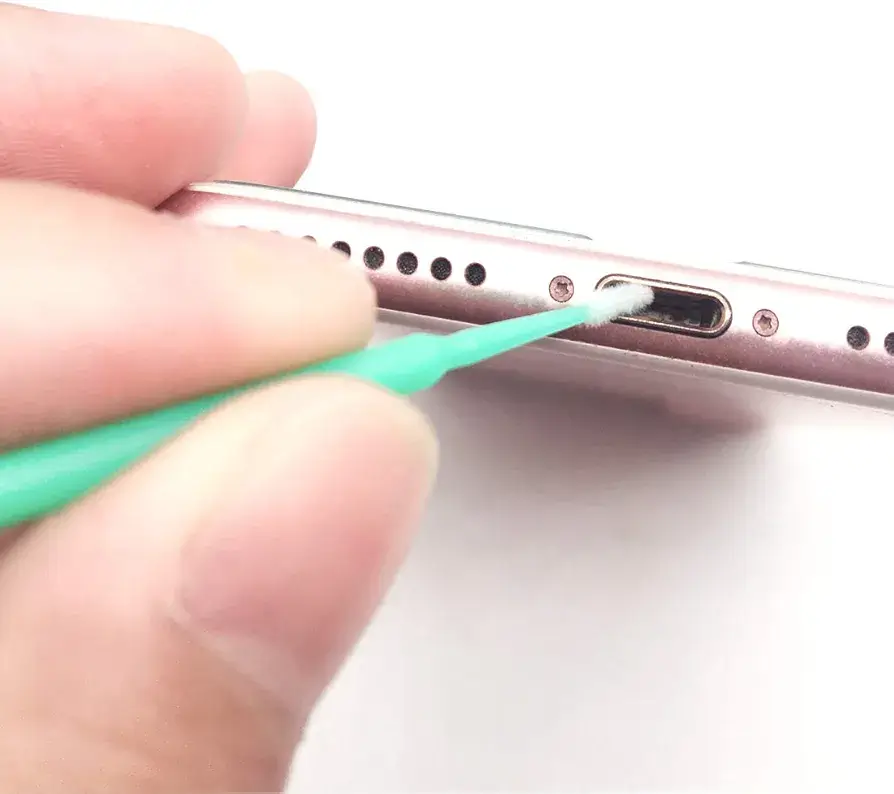
फोन चार्जर को ठीक करने के लिए उसे सुरक्षित तरीके से कैसे साफ करें:
अपना फ़ोन बंद करें
लकड़ी की टूथपिक का प्रयोग करें
धूल/गंदगी को धीरे से निकाल लें
धीरे और सावधानी से फूंक मारें (तरल पदार्थ का प्रयोग न करें!)
सावधानी- धातु की पिनों का उपयोग करने से बचें—वे आपके पोर्ट को नुकसान पहुंचा सकती हैं।.
सफाई के बाद, जांचें कि चार्जिंग में सुधार हुआ है या नहीं।.
3. चार्जिंग केबल की जांच करें (आमतौर पर केबल ही खराब होती है)
केबल में खराबी आ जाती है यदि:
चार्जिंग केवल मुड़ी हुई स्थिति में ही काम करती है
केबल गर्म हो जाती है
फोन पर "चार्जिंग रुकी हुई है" या "जांचें कि केबल ठीक से कनेक्टेड है या नहीं" संदेश दिखाई देता है।.

क्षतिग्रस्त केबल को कैसे ठीक करें
1. केबल में कहीं कट या मोड़ तो नहीं है, यह देखें।
2. समस्या की पुष्टि करने के लिए किसी दूसरे केबल का उपयोग करके देखें।
3. यदि केबल क्षतिग्रस्त हो, तो उसे निम्न से लपेटें:
हीट-श्रिंक ट्यूब/ अच्छी क्वालिटी का इलेक्ट्रिकल टेप
4. अगर केबल में गंभीर खराबी हो तो उसे बदल दें (यह सबसे सस्ता उपाय है)।
4. चार्जिंग एडाप्टर को ठीक करें
कभी-कभी यूएसबी एडाप्टर की खराबी आपके फोन के चार्ज न होने का कारण हो सकती है।.

इन चरणों को आजमाएं:
आप यह जांच सकते हैं कि एडाप्टर का यूएसबी पोर्ट ढीला है या ठीक से जुड़ा हुआ नहीं है।.
इसे किसी दूसरे सॉकेट में लगाकर देखें
सुनिश्चित करें कि यह ज़्यादा गरम न हो रहा हो।
उसी एडाप्टर के साथ दूसरी यूएसबी केबल का उपयोग करके देखें
अगर फिर भी काम नहीं कर रहा है तो एडाप्टर को बदलकर देखें।.
5. स्लो चार्जिंग सेटिंग्स को डिसेबल करें
आधुनिक फोन में ऐसी सेटिंग्स शामिल होती हैं जो चार्जिंग की गति को सीमित कर सकती हैं।.
एंड्रॉइड पर:
सेटिंग्स → बैटरी → चार्जिंग
इन विकल्पों को अक्षम करें:
अनुकूलित चार्जिंग
स्लो चार्जिंग मोड
iPhone पर
सेटिंग्स → बैटरी → बैटरी स्वास्थ्य
ऑप्टिमाइज्ड बैटरी चार्जिंग को अस्थायी रूप से बंद करें।.
6. अपने डिवाइस को रीस्टार्ट करें (सॉफ्टवेयर चार्जिंग संबंधी बग्स को ठीक करता है)

एक साधारण रीस्टार्ट से समस्या हल हो सकती है:
चार्जिंग का पता नहीं चलने की समस्या
बैटरी आइकन अटक गया है
धीमी चार्जिंग की समस्याएँ
कंप्यूटर को रीस्टार्ट करें और चार्जर को दोबारा प्लग इन करें।.
7. ढीले चार्जिंग पोर्ट को ठीक करें
यदि आपकी केबल ढीली लग रही है, तो पोर्ट में यह समस्या हो सकती है:
पहना हुआ
धूल/गंदगी से भरा हुआ
शारीरिक रूप से क्षतिग्रस्त
पोर्ट वाइन के ढीले होने के लक्षण:
चार्जर केवल कुछ निश्चित कोणों पर ही कनेक्ट होता है।
चार्जिंग बीच-बीच में रुक जाती है
घरेलू मरम्मत:
अच्छी तरह से साफ करें
एक मजबूत नई केबल का उपयोग करें
केबल को हिलाने-डुलाने से बचें।
यदि पोर्ट भौतिक रूप से टूटा हुआ है तो कृपया मरम्मत केंद्र पर जाएं।.

8. सस्ते चार्जर का इस्तेमाल बंद करें
सस्ते चार्जर ये कर सकते हैं:
चार्जिंग आईसी पॉइंट को नुकसान पहुंचाएं
अत्यधिक गर्मी पैदा करना
बैटरी की लाइफ कम हो जाती है
हमेशा उपयोग करें:
ओरिजिनल चार्जर
भारत में बीआईएस प्रमाणित चार्जर
iPhone के लिए MFi-प्रमाणित केबल
सेवा केंद्र कब जाना चाहिए
यदि आपको निम्नलिखित स्थितियों में पेशेवर सहायता की आवश्यकता है तो:
फोन चार्जर को बिल्कुल भी डिटेक्ट नहीं कर रहा है।
चार्जिंग पोर्ट टूटा हुआ या मुड़ा हुआ है
फास्ट चार्जिंग कभी काम नहीं करती
चार्जिंग के दौरान फोन अत्यधिक गर्म हो जाता है

निष्कर्ष:
धीमी चार्जिंग, चार्जिंग न होना या रुक-रुक कर चार्जिंग जैसी अधिकांश चार्जिंग समस्याएं खराब केबल या गंदे पोर्ट जैसी साधारण समस्याओं के कारण होती हैं। ऊपर बताए गए चरणों की मदद से आप बिना पैसे खर्च किए घर पर ही अपने फोन चार्जर को आसानी से ठीक कर सकते हैं।.
एंड्रॉइड/गूगल सपोर्ट – चार्जिंग संबंधी समस्या निवारण
एप्पल सपोर्ट – आधिकारिक चार्जिंग सुरक्षा
नवीनतम पोस्ट: अपने एंड्रॉइड की बैटरी को अधिक समय तक कैसे चलाएं (बैटरी की खपत कम करने के लिए 2025 की विशेषज्ञ गाइड)
भारत में अपना पुराना मोबाइल फोन कैसे बेचें (2025 के लिए चरण-दर-चरण मार्गदर्शिका)
2025 में आसानी से फोन का पता लगाएं - एंड्रॉइड और आईफोन के लिए चरण-दर-चरण तरीके।.